For Azure DevOps Services

Azure DevOps in your pocket

Boards, work items, pull requests, pipelines and dashboards. Everything your team runs in Azure DevOps, on the phone already in your hand — and on the tablet on your desk.

Boards Work items Pull requests Pipelines Dashboards Repos Wiki
iPhone, iPad, Android phones and tablets Sign in with your work account Free app
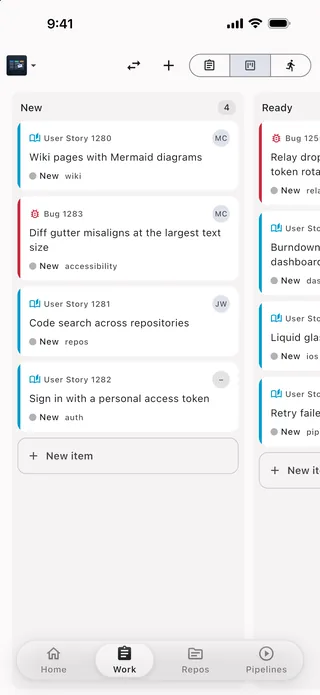
The Boardhop board view on an iPhone, showing New and Ready columns with user story and bug cards.
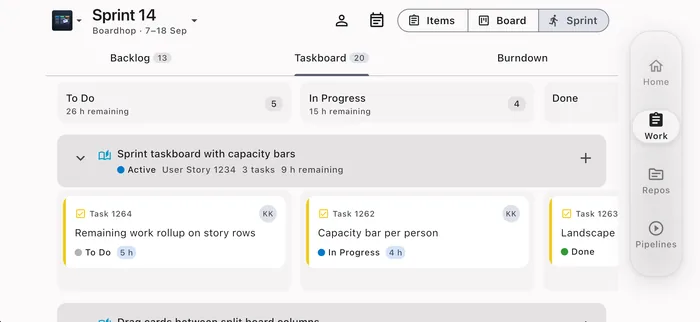
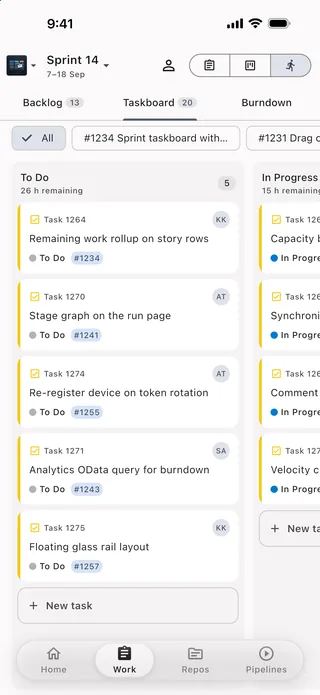
A sprint taskboard filling an iPhone held in landscape, with swimlanes of task cards.

Turn the phone sideways and the sprint taskboard uses every pixel.

What it does

The whole working day, on a screen you can hold

Not a dashboard of read-only tiles. Boardhop is built for the parts of Azure DevOps you actually touch between meetings: move a card, answer a review, approve a stage, close a bug.

Boards

Drag a card across the board

Your team's Kanban board, column rules and swimlanes intact. Press and hold a card, drag it to the next column, and the state and board column are written back exactly as the web app would write them.

  • Every board on the team, with backlog levels and filters
  • Split columns, Doing and Done, and work-in-progress limits
  • Card colours and type icons that match the web
  • New item straight from the bottom of a column
The board view with New and Ready columns.
Work items

The real work item form

Not a cut-down summary: the fields your process template actually defines, in the groups your admin laid out, with rich text, discussion, links, attachments and the history.

  • Edit any field, with the state transitions your type allows
  • Rich-text description and comments, with @mentions and #links
  • Attachments, links, children and the revision history
  • Queries and recent items, with full text search
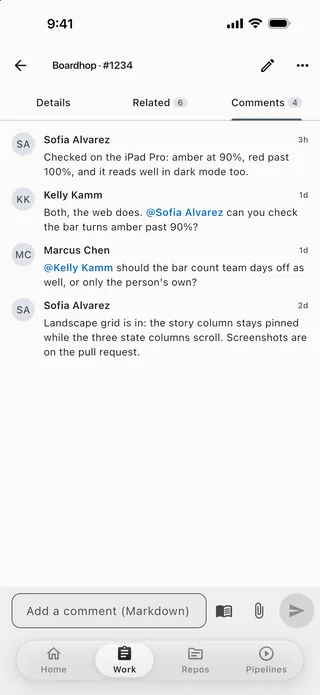
A work item form on a phone.
Pull requests

Review a pull request properly

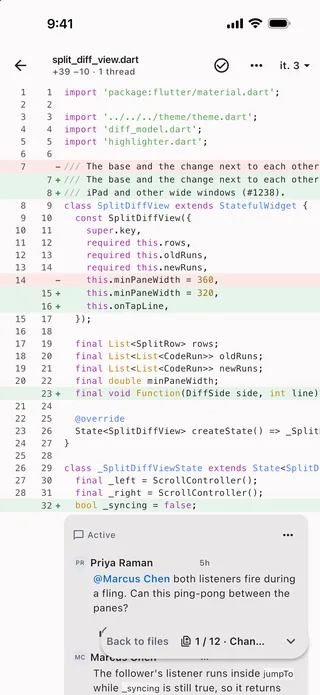
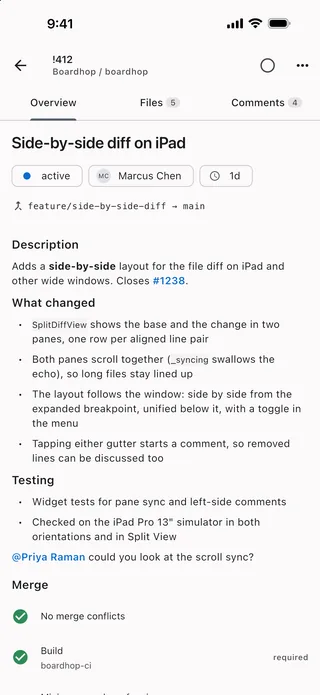
A real diff viewer — syntax highlighting, word-level changes, side-by-side on wide screens — with comment threads anchored to the lines they belong to. Reply, resolve, vote, complete.

  • File tree, per-file diffs and iteration compare
  • Line comments that follow the code across pushes
  • Approve, approve with suggestions, wait or reject
  • Complete with squash, delete branch and work item links
A syntax-highlighted diff with a comment thread.
Pipelines

Watch the build and unblock it

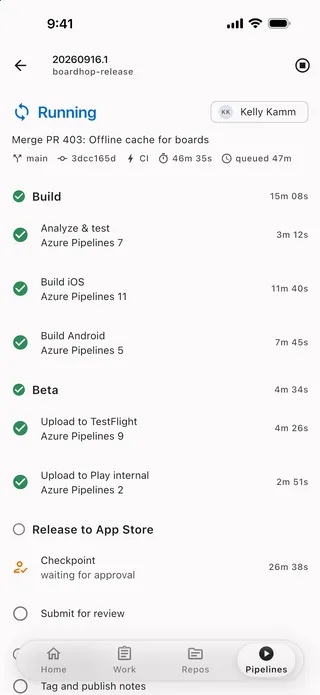
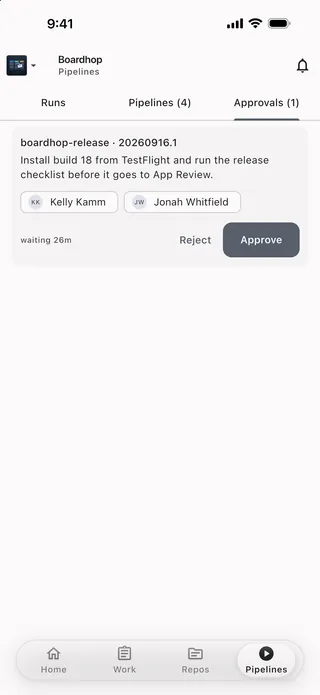
Runs, stages, jobs and task logs. When a deployment is waiting on a human, that human is often holding a phone — so approvals are one tap, with the comment box right there.

  • Run history with stage-by-stage status
  • Task logs, with search inside a log
  • Approve or reject a waiting environment check
  • Queue a run with parameters, or re-run a failed stage
A pipeline run with its stages.
Sprints

Run the sprint from the standup

The taskboard, the sprint backlog and capacity, laid out for a phone in landscape so you can move a task while you are standing up and talking.

  • Taskboard by person or by backlog item
  • Remaining work and capacity per team member
  • Burndown for the current iteration
  • Past and future iterations, a swipe away
A sprint taskboard.
Dashboards

Your team's dashboards, to go

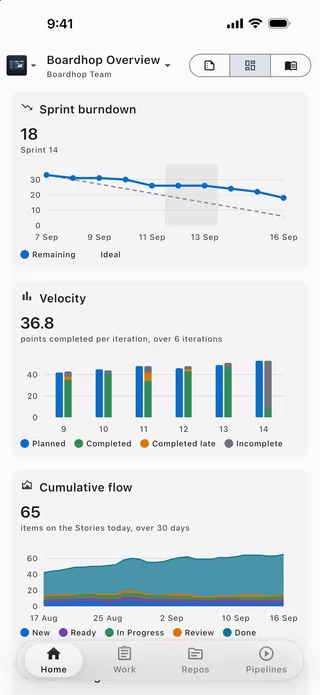
The widgets your team already built — burndown, velocity, cumulative flow, query tiles, build history — redrawn for a phone screen instead of squeezed into one.

  • Every dashboard on the project and team
  • Charts drawn natively, readable at phone size
  • Query tiles and counts that tap through to the list
  • Light and dark, and every dynamic type size
A team dashboard with charts.
Activity

Know the moment it happens

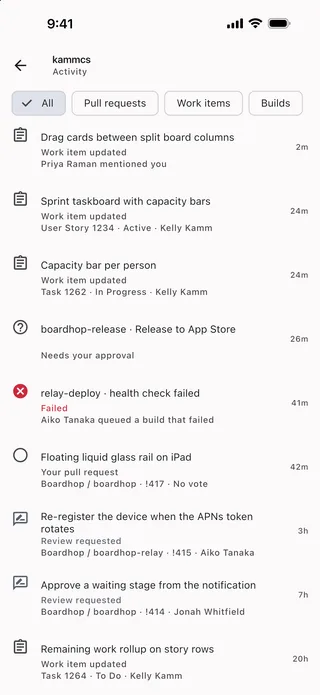
An activity feed of everything aimed at you: review requests, mentions, assignments, failed runs and waiting approvals. Add the Boardhop extension to your organization and the same events arrive as real push notifications.

  • One feed across every organization you belong to
  • Tap through to the item, the thread or the run
  • Per-event preferences and quiet hours
  • Push notifications with the team plan — see pricing
The activity feed.

And the rest of it

Everything else you reach for

Repos and code browsing

Browse any repository at any branch, tag or commit. Read a file with syntax highlighting, follow the history, compare two branches, and search code across the project.

Small edits, safely

Fix a typo in a readme or a YAML value from your phone. Boardhop commits to a new branch and opens a pull request — it never writes straight to your default branch.

Wiki

Project wikis and code wikis, rendered with their tables, Mermaid diagrams and page tree, searchable, and readable from the cache when you have no signal.

Works without a signal

Every page you have opened is cached on the device, so the app opens instantly on a train or in a basement and shows you the last thing it knew, clearly marked.

Several accounts at once

Consultants and contractors keep every tenant signed in side by side and switch between them — and between organizations and projects — without signing out.

Built for tablets too

On an iPad or an Android tablet the layout opens out into two panes — list beside detail, diff side by side — instead of stretching a phone screen.

Big screens

The tablet is not a stretched phone

Past a certain width Boardhop changes shape: a navigation rail instead of a bottom bar, a list beside the thing it opens, and a diff that finally has room to sit side by side.

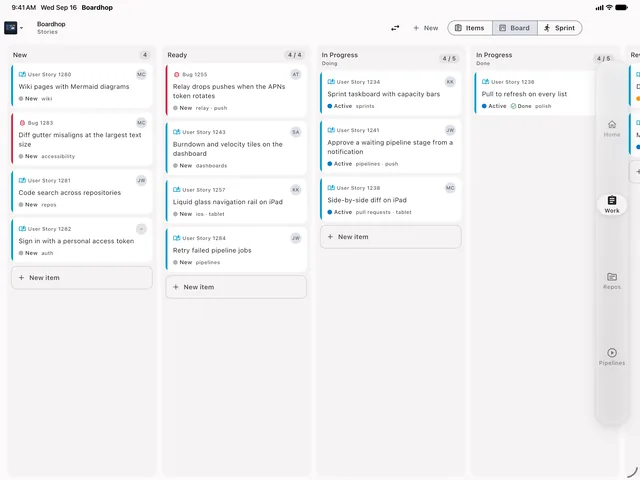
The board on an iPad in landscape, with several columns visible at once.
Every column of the board at once.
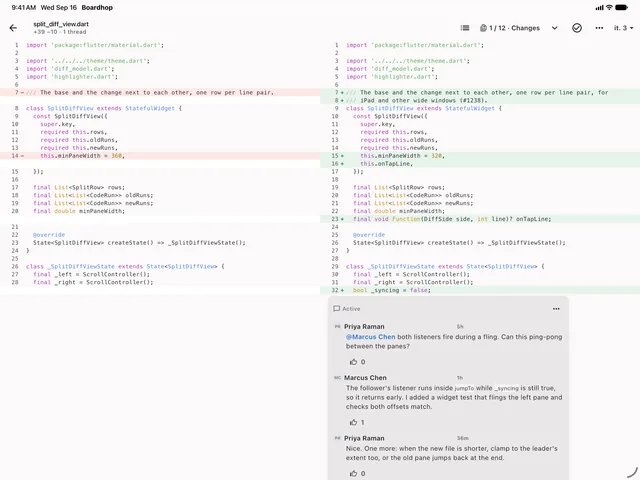
A pull request diff side by side on an iPad, with the file tree beside it.
Side-by-side diff with the file list beside it.
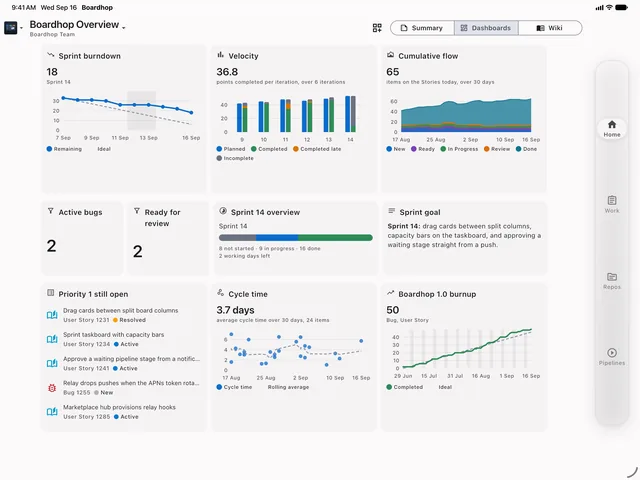
A team dashboard on an iPad with several chart widgets.
Dashboards with room for their widgets.
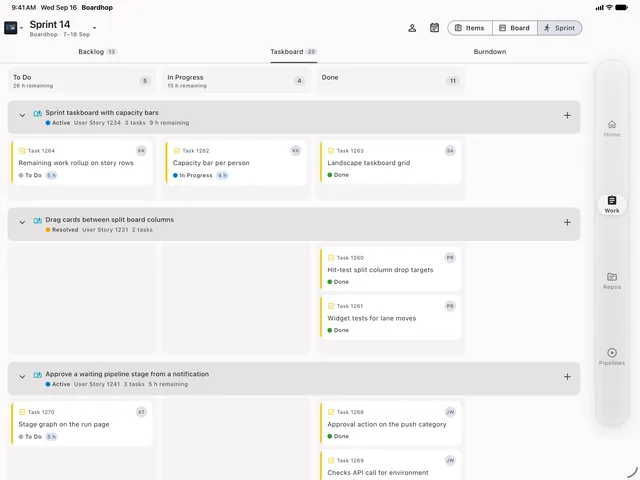
A sprint taskboard on an iPad with swimlanes across the screen.
The taskboard as a standup actually needs it.

A look around

More of the app

Pricing

The app is free. The relay is the product.

Boardhop itself costs nothing and never will. What an organization can buy is the Boardhop relay: the piece that turns your Azure DevOps events into real push notifications, and the live features that need a server listening on your behalf.

Free

$0always

Everything in the app, for anyone with an Azure DevOps account.

  • Boards, backlogs, sprints and taskboards
  • Work item forms, queries and search
  • Pull request review, diffs and votes
  • Pipelines, logs and approvals
  • Repos, code browsing and wiki
  • Dashboards and charts
  • Activity feed, refreshed while the app is open
  • Offline cache and multiple accounts
Get the beta

Self-hosted relay

Talk to us

For tenants whose rules say event metadata may not leave their own cloud.

  • The same relay, deployed in your tenancy
  • Event metadata never leaves your boundary
  • Only opaque pointers reach Apple and Google
  • Annual agreement, invoiced
Get in touch

Pushes carry a pointer, not your content: who did what, to which item, and a link. Comment text, code and descriptions are fetched by your phone with your own credentials and never pass through us. How Boardhop handles data.

Roadmap

Where it is and where it is going

Boardhop is in beta. This is an honest list, not a wish list: what works today, what is being built, and what is planned.

Shipped

Boards, work items, pull requests, pipelines, repos, wiki, dashboards, sprints, search

The full app on iPhone, iPad and Android phones and tablets, in light and dark, with an offline cache and multiple accounts.

In beta

Push notifications and the Marketplace extension

The relay and the Boardhop extension are running against real organizations. Free for beta organizations; the team plan starts when the beta ends.

Building

Live pipeline log tail

Azure DevOps only publishes a task's log once the task finishes, so following a running step needs the relay to listen on your behalf. It will be part of the team plan at no extra cost.

Building

Foldables and dual-screen phones

Layouts that respect the hinge and the system's edge, so a board or a diff splits along the fold instead of across it.

Planned

Personal access token sign-in

For people whose tenant will not let a third-party app use their work account. Microsoft Entra sign-in is the only option today.

Planned

Test plans, artifacts and richer queries

The parts of Azure DevOps Boardhop does not reach yet, in the order beta teams ask for them.

Not planned

Azure DevOps Server (on-premises)

Boardhop targets Azure DevOps Services in the cloud. On-premises collections are not supported and are not currently on the plan.

Questions

The things people ask first

How do I sign in?

With the same Microsoft work or school account you use for Azure DevOps, through Microsoft Entra ID. Boardhop never sees your password; sign-in happens in the system browser or the Microsoft Authenticator app, and the app receives a token scoped to the Azure DevOps permissions you already have.

Does my administrator have to approve anything?

Some tenants require an administrator to consent to a new application once, for everyone. If yours does, the sign-in screen will say so and your administrator can approve it in a couple of minutes. Push notifications separately need an administrator to install the Boardhop extension in the organization.

Can Boardhop see my code and my comments?

No. The app talks to Azure DevOps directly from your device with your own token. Nothing you read or write passes through our servers. The only thing that touches our relay is the event metadata Azure DevOps sends when something happens — ids, an event type and a short title — which is turned into a notification pointer and not kept. Read the detail.

What does Boardhop cost?

The app is free, with no adverts, no tracking and no upgrade prompts. An organization that wants push notifications buys the team relay at $3 per active user per month, with a $15 monthly minimum and a 30-day trial that needs no card. Nothing is sold inside the app.

What counts as an "active user"?

Someone who opened Boardhop for your organization at least once during the calendar month. If a person does not open the app that month, you are not billed for them — and your administrator can see the counted list in the admin hub before the invoice.

Does it work with Azure DevOps Server on-premises?

Not today. Boardhop is built for Azure DevOps Services, the cloud-hosted product at dev.azure.com.

Which devices are supported?

iPhone and iPad, and Android phones and tablets. Both layouts are designed for the size they are on — phone, tablet, portrait and landscape — and the app supports dynamic type, dark mode and screen readers.

Beta

Try it on your own boards

Boardhop is in closed beta on TestFlight and Google Play. Tell us the organization you would try it against and we will send an invitation.

App Store and Google Play links appear here at public launch.